

Bookings
The room books itself, prices itself, and pays for itself.
One booking record runs the room: reservations, dynamic pricing, door access, guest WiFi, and the live display outside the door. Running in production today.
Running live at Granite City Workspaces, Folsom, CA. 8 bookable rooms.
Everything on one record
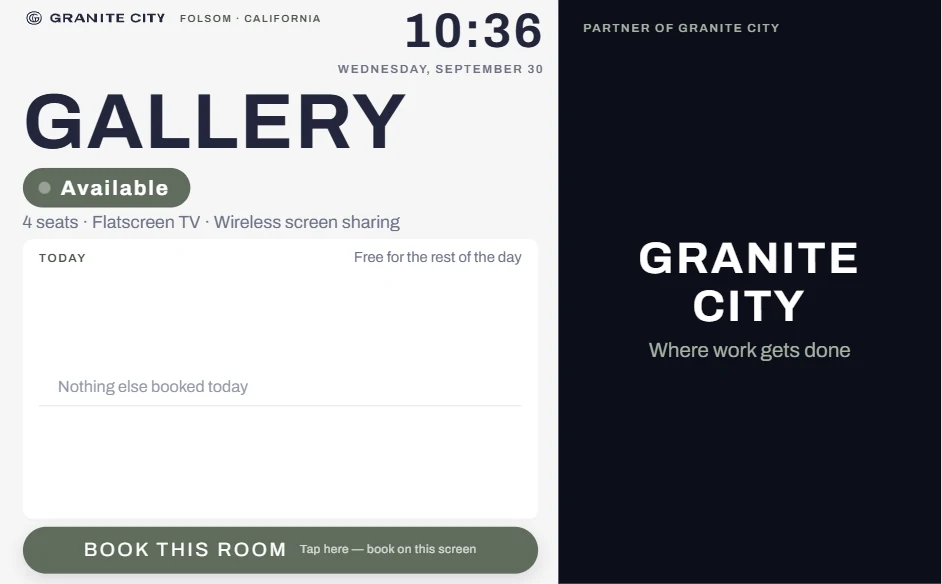
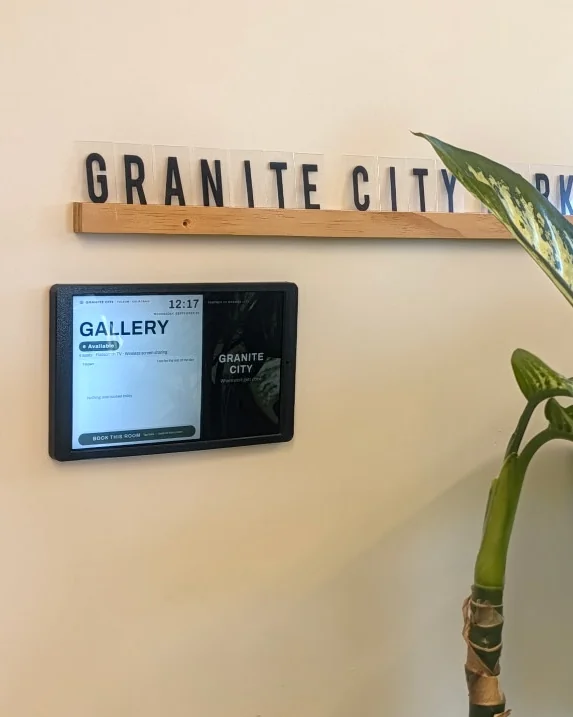
Live room displays
Sponsor ads, Luma event takeovers, and welcome screens on the screen outside the door.
Explore →Dynamic pricing
See a booking get priced: six rules, real examples.
Explore →Door access
The reservation is the door credential, for the exact window.
Explore →Guest WiFi
A scoped voucher issued with the door grant. No front-desk step.
Explore →Camera-verified occupancy
No-show rooms release themselves. No footage stored.
Explore →Voice booking (beta)
Book by phone call. AI voice agent, now in limited beta.
Explore →Dynamic pricing
Your rooms earn more at peak, and fill up when they're slow. Automatically.
Set rules once. Every booking is priced the moment it's made, and the record shows which rule fired.
- 1
You set the rules
Per room, by day of week, time window, date range, or how full the calendar is. Rooms opt in individually.
- 2
Price adjusts on its own
When a guest books, the rate is calculated instantly. No manual changes, no spreadsheets.
- 3
Every booking is explained
The booking records exactly which rule fired and what it discounted or added.
See it work: one room, six rules
Illustrative numbers for a $40/hour room. You set your own rates and rules.
The room opens in 2 hours and is still unbooked
$40/hr
Fills last-minute gaps instead of letting the hour go empty.
booking record → rule fired: same_day
Running today at Granite City Workspaces:
- 17
- rules running today
- 6
- rule types
- 10
- rooms priced against live local-market data
The automated visit
A guest's whole visit runs on the booking.
- 1
Booked.
The reservation becomes the source of truth.
- 2
Door and WiFi already waiting.
One grant provisions both.
- 3
Tablet shows welcome branding on arrival.
The display follows the booking.
- 4
Access quietly expires.
The exact reserved window closes automatically.
Every grant records its request, response, and observed state in the audit trail. A retry-with-backoff dispatcher protects delivery; credential tiers configure access for staff, members, and cleaners; every door supports emergency lockdown and fails secure.
Access granted
Welcome back, Maya.
Front Entry · 09:41
More included
Automation beyond the booking itself.
Camera-verified occupancy
A vision model reads quiet, moderate, or busy on a timer and caches the result so load never multiplies back to camera hardware. No-show rooms release themselves, occupied-but-unbooked spaces get nudged toward booking, and no footage is stored or streamed.
Contracts
Tier-based agreements attach and e-sign automatically, with violation detection and staff override logging.
Voice booking
A phone call can book a room, tour, day pass, or membership — no app needed, now in limited beta.
Learn more →Built for operators
The same booking record, adapted to the space.
Coworking Spaces
- Meeting-room credits calculated to the cent
- Tour-to-membership booking
- A tablet that carries sponsor revenue
- Guest WiFi with no front-desk step
Corporate Campuses & Offices
- Conference rooms with department chargebacks
- Badge and room access from one record
- Lockdown-ready doors
Fitness & Wellness Studios
- Class and room scheduling
- Demand pricing that reacts to peak hours
Smart Buildings & Portfolios
- One booking, access, WiFi, and occupancy record across every tenant and site
Compare
One booking record instead of four disconnected systems.
Swipe to compare all columns →
| Capability | Booking-only tools (Skedda, Robin, Deskpass) | Access-only tools (Kisi, Openpath) | Marketplace listing tools (LiquidSpace) | CommonSignal |
|---|---|---|---|---|
| Room/desk/office booking | Yes | Not included | Marketplace reservations | Yes — one shared calendar |
| Door access tied to the booking | Not included | Access, not booking-driven | Not included | Yes — same record, plus lockdown |
| Guest WiFi provisioning | Not included | Not included | Not included | Yes — scoped to the visit |
| AI camera-verified occupancy | Not included | Not included | Not included | Yes — quiet/moderate/busy read |
| Dynamic pricing with live local-market data | Limited rules | Not included | Marketplace-set rates | Yes: 6 live rule types plus local market data |
| Branded physical room displays | Basic status displays | Not included | Not included | Yes — ads, Luma event takeovers, and welcome screens |
| Contract/e-sign enforcement | Not included | Not included | Not included | Yes — required by room tier |
Pricing
Starts at $99/month
Final pricing depends on your space: rooms, doors, and locations. We'll scope your actual footprint.
Request a DemoFAQ
Booking questions, answered plainly.
- Does the tablet really change for sponsors and events on its own?
- Yes. When a public Luma event matches your rules, or names the room as its location, the display switches to that event's branding automatically, with no admin step, and reverts the moment the event ends.
- Do the cameras record or store video?
- No footage is stored or streamed to any screen — occupancy is read from a snapshot, converted to a quiet/moderate/busy read, and the image is discarded.
- What is dynamic pricing for room booking?
- Dynamic pricing automatically adjusts a room's rate based on signals like time of day, day of week, how full the calendar already is, or a limited-time promotion — the same idea hotel and airfare pricing uses, applied to bookable rooms and offices.
- How is this different from a standalone booking tool like Skedda or Robin?
- Those tools manage a calendar. CommonSignal's booking record also drives the door, the guest WiFi, and the physical display outside the room — one system instead of a booking tool plus separate access and signage systems.
- How long does setup take, and what hardware/calendars does it work with?
- Most spaces are running within a few weeks, depending on door hardware readiness. CommonSignal's access and door features run on UniFi Access hardware and sync with Google Calendar. FollowThrough Works, our technical services partner, can scope, procure, and install it at a below-market rate.
- What does CommonSignal cost?
- CommonSignal starts at $99/month. Final pricing depends on the size of your space, number of doors, and locations. Request a demo and we'll scope it.
Request a demo
See it running on a real space.
Tell us what you manage and we'll walk you through bookings, pricing, access, WiFi, and displays on one record.